

When it comes to building a home lab, choosing the right server hardware is a critical decision. Servers are the backbone of any IT infrastructure, and they are used for everything from running applications to hosting virtual machines. In a home lab environment, servers can be used to experiment with new software, practice system administration tasks, or even host your own website. While enterprise-grade servers with powerful Intel Xeon or AMD EPYC processors might be the first thing that comes to mind, these can be expensive and overkill for beginners just starting out with a home lab.
Fortunately, there are many options available for those on a budget or just getting started. For example, you can often find used servers for sale on marketplaces such as eBay. Just be sure to do your research and verify the seller’s reputation before making a purchase. Another option is to repurpose an older computer that was previously used for home or office use. Many new coming home lab enthusiasts will repurpose their older computers for home lab use when getting started in order to cut down on costs. As you start looking into obtaining your own server, it’s important to consider things such as the form factor and hardware that will best suite your needs. Listed below, we will go into detail on each of these items including pros, cons, and use cases.
Server Form Factors – An Overview:
While planning your home lab out, it is a good idea to consider the type of physical forms that servers come in and determine which would be best suited for your needs and environment. Here is a brief overview of the physical servers we will talk about in more detail within this post:
- Tower Servers are standalone servers that are designed to be placed on a desk or floor. They are typically smaller and quieter than rack servers, making them a good option for home lab enthusiasts who need a server but don’t have a dedicated server room.
- Rack Servers are designed to be mounted in a server rack. They are usually more powerful than tower servers and can be easily stacked for efficient use of space. They tend to be noisier and generate more heat, so they are better suited for larger spaces with proper cooling and noise reduction measures.
- Blade Servers are ultra-dense servers that are designed to be mounted in a blade chassis. They are a good option for home lab enthusiasts who need a lot of computing power but have limited space. Blade servers are also more energy-efficient than traditional rack servers, making them a good choice for those who are conscious of their power consumption.
- MicroServers are small, low-power servers that are designed for lightweight workloads. They are a good option for home lab enthusiasts who need a server for basic file sharing, web serving, or other similar tasks. Microservers tend to be less expensive and easier to manage than other types of servers.
Each type of server has its own strengths and weaknesses, so it’s important to consider your specific needs and use case when choosing a server for your home lab.
Server Form Factors – Details:
Tower Servers
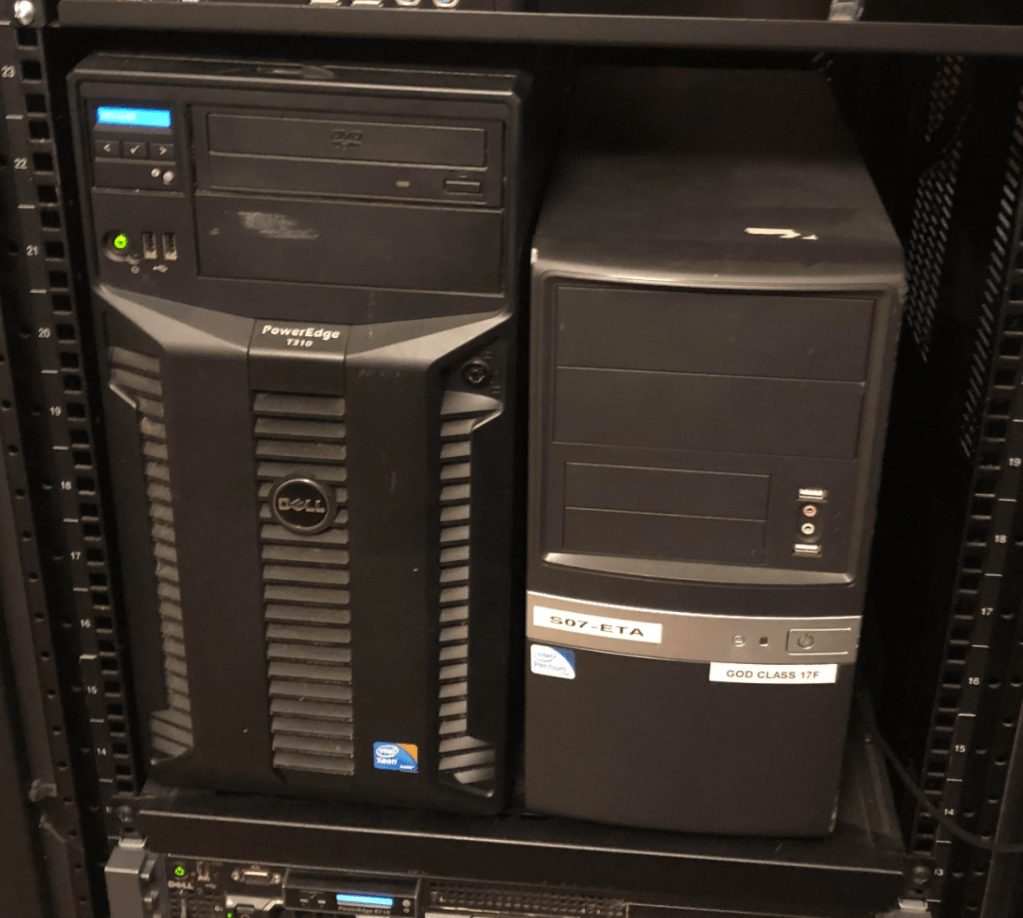
Tower servers are an excellent option for home lab enthusiasts who want a powerful and flexible server that can easily fit into a home office or closet. These servers come in various sizes, from small form factor models that can fit on a desktop to larger models that are nearly as big as a full-sized refrigerator. One of the primary advantages of a tower server is its flexibility; it can be customized to fit the needs of almost any use case. They are also easier to service and upgrade compared to rack-mounted servers since all of the components are easily accessible.
However, there are some downsides to tower servers. They take up more physical space than rack-mounted servers, which can be a concern for those with limited space. Additionally, they tend to have less efficient cooling since they are designed to be used in open environments, which can lead to higher operating costs over time. They also don’t offer as much scalability as rack-mounted servers, which can be a disadvantage for those who need to quickly and easily add more computing power to their setup.
Tower servers are best suited for use cases that require flexibility, customization, and accessibility. For example, they are an excellent option for home media servers, personal cloud storage, or a home lab setup that requires more power than a typical desktop or laptop can provide. They can also be used for virtualization, software development, and small business applications. Overall, tower servers are an excellent choice for those who need the power and versatility of a server in a form factor that is easy to manage and maintain.
Rack Servers
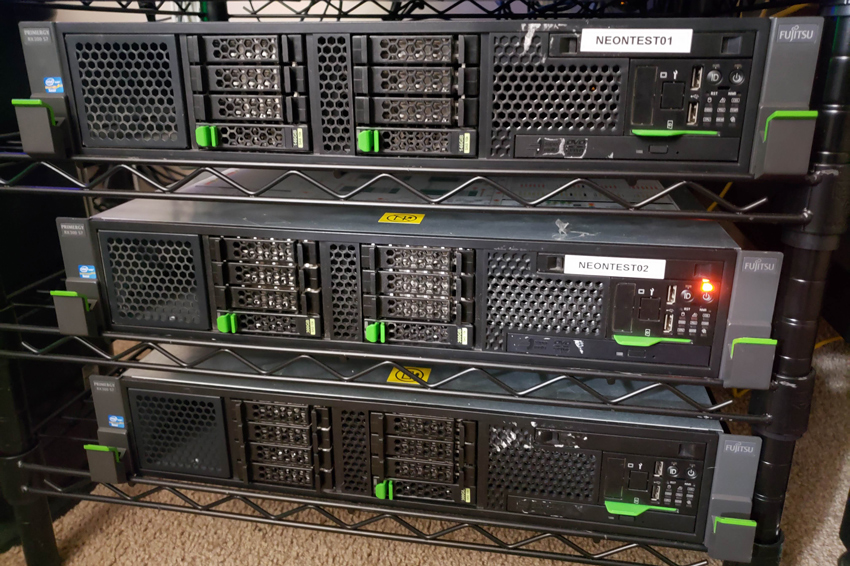
Rack servers are an ideal choice for those who need a more powerful and expandable server solution for their home lab. They are designed to be mounted in a standard server rack, allowing you to stack multiple servers on top of each other to save space. Rack servers are typically more expensive than tower servers, but they offer many benefits that make them worth the investment for some users.
One of the key advantages of a rack server is its scalability. Because they are designed for use in a data center environment, rack servers typically support more memory, storage, and expansion options than tower servers. This makes them a great choice for running resource-intensive applications or hosting multiple virtual machines. Another advantage of rack servers is their high availability. They often come with redundant power supplies and cooling systems, as well as hot-swappable components, which means that you can replace failed components without taking the server offline. This makes them an ideal choice for those who need a server that can run 24/7 without interruption.
However, there are some downsides to using a rack server in a home lab environment. One of the biggest is the noise level. Rack servers can be quite loud, which can be a problem if you plan to keep your server in a living space. Additionally, because they are designed for use in a data center, they can be more difficult to set up and configure than a tower server.
Overall, rack servers are an excellent choice for those who need a powerful, scalable, and highly available server solution for their home lab. They are more expensive and louder than tower servers, but their benefits can make them a worthwhile investment for some users.
Blade Servers

Blade servers are designed to be space-efficient and highly modular. They are built with a chassis that can hold multiple server blades, which are essentially individual server units. Each blade has its own set of CPUs, memory, and storage, and can be hot-swapped in and out of the chassis. This makes blade servers easy to scale and maintain. Additionally, because of their small form factor, they can be a great option for those with limited physical space.
One advantage of blade servers is their high density. A single chassis can hold dozens of individual server blades, allowing for a significant amount of computing power in a small space. This makes them ideal for applications such as virtualization, where multiple virtual machines can be run on a single blade server.
However, there are some downsides to blade servers. Because each blade has its own set of components, there can be limited room for expansion within each blade. Upgrading components may require replacing the entire blade, which can be costly. Additionally, because blade servers are highly modular, they may require additional networking and storage hardware to be fully operational.
Overall, blade servers can be a great option for those with limited space who need a high density of computing power. They are also a good choice for those running virtualization software. However, they may not be the best choice for those who need to frequently upgrade or replace components, as this can be more difficult and expensive than with other server types.
MicroServers

Microservers are compact, low-power servers designed for basic computing needs. They are ideal for small businesses or home labs that need to run lightweight applications or manage files and data storage. Microservers typically use low-power processors such as Intel Atom or Celeron, and they are optimized for energy efficiency and low noise.
One of the primary advantages of microservers is their small size, which allows for easy placement and use in small spaces. They are also relatively inexpensive, making them a cost-effective option for those on a budget. However, microservers typically have limited storage and processing capabilities, which may limit their usefulness for more demanding applications.
Use cases for microservers include running lightweight web servers, hosting small-scale databases, and managing file and print services.
Server Hardware Specifications

When it comes to running virtual machines in a home lab environment, there are several important hardware components to consider. These include the processor, memory, and storage. The processor is responsible for executing instructions and running applications, while memory (RAM) provides temporary storage for data and instructions that the processor is currently using. Storage, on the other hand, provides long-term storage for files, documents, and other data.
Of these components, the most important for a home lab environment is typically memory. This is because virtual machines require a lot of memory to operate efficiently. Each virtual machine needs its own dedicated memory space, so the more virtual machines you plan to run simultaneously, the more memory you will need. A good rule of thumb is to aim for at least a minimum of 16GB of RAM, although more is recommended as running multiple virtual machines on that amount causes performance issues.
The processor is also important, as virtual machines require a certain level of processing power to run smoothly. The number of processor cores is important, as it determines how many virtual machines can run concurrently. For most home lab enthusiasts, a quad-core processor at minimum is recommended.
Storage is also a consideration, although it is generally less important than memory and the processor. Solid-state drives (SSDs) are ideal for running virtual machines, as they offer faster read and write speeds compared to traditional hard disk drives (HDDs). However, HDDs can still be used for storage, as they offer more storage capacity for the price.
What About Server Manufacturers?

When it comes to server hardware, there are several brands that are popular among home lab enthusiasts. Some of the most common brands include Dell, HP, Lenovo, and Supermicro. Each brand has its own strengths and weaknesses, and choosing the right one will depend on your specific needs and budget:
- Dell is a popular choice for many home lab enthusiasts due to its wide range of server options, from tower servers to blade servers. Dell servers also tend to be highly configurable, allowing you to customize the hardware to meet your specific needs. In addition, Dell offers a range of management tools that can make it easier to manage your server environment.
- HP (now HPE) is another popular brand for home lab servers, and its ProLiant line of servers is well-regarded for its reliability and performance. HP servers are known for their strong hardware specifications and for their compatibility with a wide range of operating systems and software.
- Lenovo is a newer player in the server hardware space, but it has quickly become a popular choice for home lab enthusiasts due to its affordable prices and solid hardware specifications. Lenovo servers are also known for their ease of use, with a simple setup process and intuitive management tools.
- Supermicro is a lesser-known brand in the home lab community, but it is well-regarded for its high-quality server hardware. Supermicro servers are known for their durability and flexibility, and they are often used in mission-critical environments.
Ultimately, the choice of server brand will depend on your specific needs and budget. It’s important to do your research and choose a brand that offers the right balance of performance, reliability, and affordability for your home lab.
Wrapping Up
Building a home lab is an exciting and rewarding undertaking, and choosing the right server hardware is an important part of that process. Servers are a crucial component of any home lab setup, and selecting the right hardware is a critical decision that can affect your entire IT infrastructure.
As we have seen, there are many options available for those on a budget or just starting out, from repurposed computers to affordable entry-level servers. Each form factor – tower, rack, blade, and micro – has its own set of advantages and disadvantages, depending on your specific needs and use cases. In terms of hardware specs, the CPU, memory, and storage are all important components to consider when running virtual machines, but the amount of memory you have is often the most important factor in ensuring optimal performance. When it comes to choosing a brand, the main players in the market are Dell, HP, and Lenovo, each with its own strengths and weaknesses.
It’s important to remember that as you gain experience and expertise, you can always upgrade your server hardware to keep up with your growing needs. With the right combination of hardware and software, you can create a powerful home lab that can help you learn new skills, experiment with new technologies, and even provide services to others.

About Home Lab Mentor
Home Lab Mentor is dedicated to educating individuals of all skill levels in various IT projects with a focus on home labs.
Newsletter
Subscribe to the email newsletter to gain updates on new posts and projects.
 Home Lab Mentor