

Storage is an essential component of any home lab or IT infrastructure, providing a means of storing and managing data. With the proliferation of digital information and the increasing need for efficient data management, the demand for storage solutions has only continued to grow. From traditional hard disk drives to solid-state drives, and network-attached storage to direct-attached storage, there are a variety of storage options available for home lab enthusiasts and IT professionals alike. In this post, we’ll explore the different types of hardware storage, their unique features and benefits, and how they can be utilized in a home lab or IT environment.
Storage Devices – Overview:
Storage devices are an important consideration in any home lab environment, as they provide the space necessary to store operating system images, virtual machines, and other data. There are several types of storage devices to consider, each with their own strengths and weaknesses:
- Hard Disk Drives (HDD) are traditional spinning disks that store data magnetically. They come in a variety of sizes and speeds and are relatively inexpensive. HDDs are a great choice for storing large amounts of data that don’t need to be accessed quickly.
- Solid State Drives (SSD) are newer and faster storage devices that use flash memory to store data. They have no moving parts, making them more reliable and durable than HDDs. They are more expensive than HDDs, but are ideal for storing frequently accessed data or running operating systems and applications.
- Network-Attached Storage (NAS) devices are essentially a mini file server that connects to your home network. They allow you to store and access files from multiple devices in your home. NAS devices can have multiple hard drives, allowing you to set up various RAID configurations for data redundancy and performance.
- Direct-Attached Storage (DAS) that connect directly to a single computer or server. They can be internal or external and can use HDDs or SSDs. DAS devices are typically faster than NAS devices because of the direct connection to a single system.
- Storage Area Network (SAN) is a dedicated high-speed network that provides access access to block level data storage. While SANs are commonly used in enterprise environments, they are less common in home lab settings. This is because SANs can be expensive and complex to set up and maintain, requiring dedicated hardware and specialized knowledge. As such, this overview will be the only explanation on this type of storage, as it is outside the scope of this post.
Storage Devices – Details:
Hard disk drives (hdd)

HDDs are one of the most common types of storage devices used in home labs. They are available in a range of sizes and speeds, are are typically used for storing large amounts of data. The most common form factor for HDDs is the 3.5-inch size, but smaller 2.5-inch HDDs are also available, which are commonly used in laptops and smaller form factor servers.
HDDs use spinning disks to store and retrieve data. The disks are coated with a magnetic material that can be magnetized or demagnetized to store data. The read/write heads on an actuator arm access the data on the disk by moving back and forth across the disk’s surface.
When choosing an HDD, it’s important to consider factors such as capacity, speed, and reliability. Capacity is the amount of data that can be stored on the drive, and is typically measured in terabytes (TB). Speed is measured in Revolutions Per Minute (RPM), and determines how quickly data can be read from and written to the drive. Higher RPM drives are faster, but can generate more noise. Reliability is a measure of how long the drive is likely to last before it fails, and is typically measured in Mean Time Between Failures (MTBF).
Overall, HDDs are a great choice for storing large amounts of data that needs to be accessed quickly, and are a cost-effective option for home lab environments. However, they can be susceptible to mechanical failures, and are not recommended for use in environments where the drive may be subjected to physical shocks or vibrations.
Solid State Drives (SSD)

SSDs are a type of storage device that use NAND-based flash memory to store and retrieve data. They are faster, quieter, and more durable than traditional hard disk drives. SSDs come in a variety of form factors, including 2.5-inch drives and M.2 cards, and can be connected to your home lab via SATA or PCIe.
SSDs are known for their fast read and write speeds, making them ideal for use as a boot drive or for running virtual machines. They also have lower latency than hard drives, which can improve overall system performance. However, SSDs are generally more expensive than hard drives and have a limited lifespan due to the finite number of writes that can be performed on the flash memory cells.
When choosing an SSD for your home lab, consider factors such as capacity, speed, and price. If you have high performance requirements, a PCIe NVMe SSD can provide even faster speeds than a SATA SSD. Additionally, be sure to check the manufacturer’s specifications for the drive’s endurance rating to ensure it meets your needs.
Network Attached Storage (NAS)
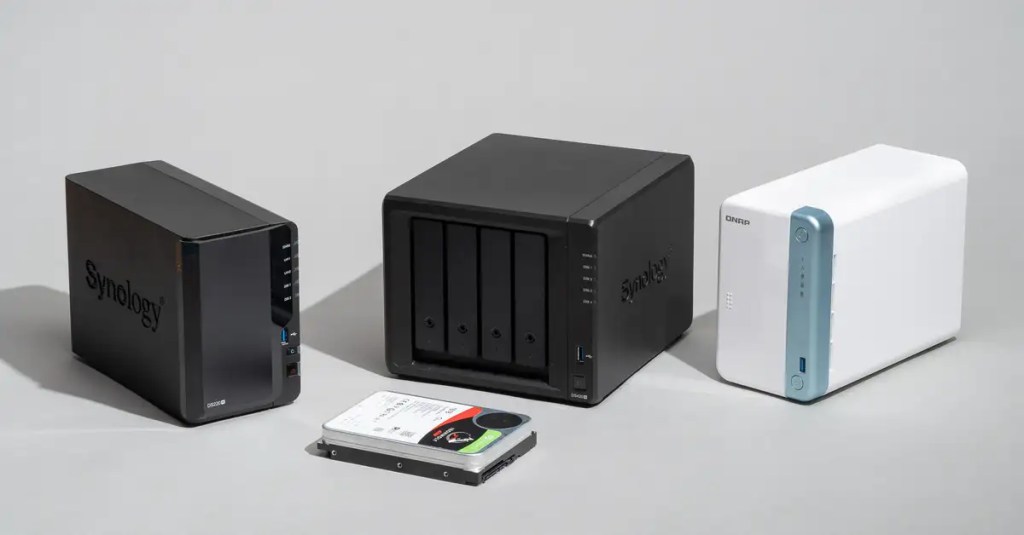
NAS is a type of storage device that is connected to your network and can be accessed by multiple devices. NAS devices can be used for data backup, file sharing, and media streaming. They are typically equipped with multiple hard drives, which can be configured in various RAID configurations to provide data redundancy and protect against drive failure. Some NAS devices also support hot-swappable drive bays, allowing you to replace a failed drive without shutting down the system.
When choosing a NAS device, it’s important to consider factors such as the number of drive bays, the supported RAID configurations, and the type of network connection (Ethernet, Wi-Fi, or both). Some NAS devices also come with additional features such as media servers, remote access, and cloud backup integration. Additionally, you’ll want to make sure that the NAS device is compatible with your operating system/s and has adequate storage capacity for your needs.
Direct-Attached Storage (DAS)

DAS is a type of storage device that is connected directly to a computer or server. Unlike network-attached storage (NAS), DAS does not rely on a network connection to transfer data. Instead, data is transferred through a high-speed connection such as USB, Thunderbolt, or SATA.
DAS can come in a variety of form factors, including external hard drives, solid-state drives, and even multi-drive enclosures. Some DAS devices are designed for use with a specific operating system or application, while others are more flexible and can work with a variety of systems.
DAS can be a good option for users who need fast access to their data and don’t require the sharing capabilities of network-attached storage. It can also be a cost-effective solution for small businesses that need to store and access data locally. However, DAS has some limitations, including limited scalability and the need to physically connect the device to a computer or server.
Wrapping Up
Storage is a critical component of any home lab setup, and selecting the right storage solution depends on a variety of factors such as data capacity, speed, and accessibility. Hard disk drives (HDDs) and solid-state drives (SSDs) offer unique advantages and disadvantages, while network-attached storage (NAS) and direct-attached storage (DAS) provide distinct methods for accessing and sharing data across a network. By understanding the strengths and limitations of each physical storage option, home lab hobbyists can build a storage infrastructure that meets their needs and supports their projects.

About Home Lab Mentor
Home Lab Mentor is dedicated to educating individuals of all skill levels in various IT projects with a focus on home labs.
Newsletter
Subscribe to the email newsletter to gain updates on new posts and projects.
 Home Lab Mentor